Components Search Manager Options: Difference between revisions
From Joomla! Documentation
Robert.skop (talk | contribs) No edit summary |
Robert.skop (talk | contribs) No edit summary |
||
| Line 23: | Line 23: | ||
==Component== | ==Component== | ||
[[Image:Help30-components-search-manager-options-screen.png]] | |||
*'''Gather Search Statistics'''. Record the search phrases submitted by visitors. | *'''Gather Search Statistics'''. Record the search phrases submitted by visitors. | ||
*'''Use Search Areas'''. Show the search areas checkboxes. | *'''Use Search Areas'''. Show the search areas checkboxes. | ||
Revision as of 17:25, 7 May 2013
How to Access
- Click the Global Configuration button in the Control Panel and click the Search button on left side panel, or
- Select Components → Search → Options from the drop-down menus.
Screenshot
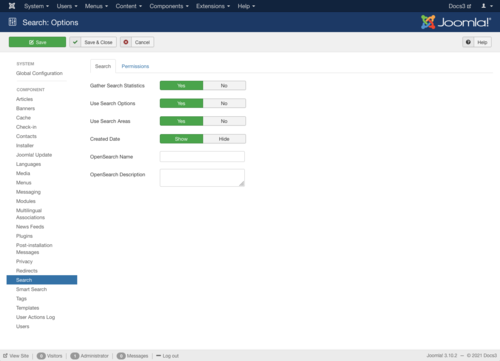
Description
- Details on Component Options
- Details on Permissions configuration
Toolbar
At the top left you will see the toolbar:

The functions are:
<translate>
- Save. Saves the global configuration settings and stays in the current screen.</translate>
<translate>
- Save & Close. Saves the global configuration settings and closes the current screen.</translate>
<translate>
- Cancel. Closes the current screen and returns to the previous screen without saving any modifications you may have made.</translate>
<translate>
- Help. Opens this help screen.</translate>
Component

- Gather Search Statistics. Record the search phrases submitted by visitors.
- Use Search Areas. Show the search areas checkboxes.
- Created Date. Show Created Date
- OpenSearch Name. Name displayed for this site as a search provider.
- OpenSearch Description. Description displayed for this site as a search provider.
Permissions

- Configure. Allows users in the group to edit the options of this extension.
- Access Administration Interface. Allows users in the group to access the administration interface for this extension.
- Edit State. Allows users in the group to change the state of any content in this extension.